The long-standing grievance over AI design tools, blurry output, jumbled text, and little useful for actual client work, is mostly no longer valid. By 2026, these techniques will generate true editable vector files, readable text inside images, and generations that are safe enough for commercial use in client campaigns.
Finding a tool to create something attractive is no longer the real difficulty. It’s figuring out which one best suits your real workflow. The majority of working designers combine a planning tool, a generating tool, and one or two experts for tasks like typography or vectors. Here’s where each of the top choices truly works.
1. Adobe Firefly — the commercially safe choice for pro pipelines
Firefly is integrated directly into Photoshop and Illustrator, and of all the generation tools on our list, it has the most obvious commercial-rights narrative. Its greatest selling point isn’t unadulterated creative flare. One of the most used AI tools in professional workflows is Photoshop’s Generative Fill and Expand, which are excellent for correcting framing, eliminating distractions, and quickly creating alternative crops.
For preliminary icon guidance, Illustrator’s Text to Vector Graphic is helpful, but you should still manually tidy up the final vectors.
Best for: Client and campaign work where commercially safe, legally clean output matters more than pushing visual boundaries.
Pricing: Starts around $9.99/month standalone; also bundled into Creative Cloud plans.
2. Canva Magic Studio — the fastest all-in-one workspace
For teams who need to move quickly across social media posts, slides, and marketing assets without a high learning curve, Canva continues to be the standard.
Magic Studio is particularly helpful for teams working with marketing or founders who aren’t skilled designers because it combines AI layout ideas, background creation, and one-click design variations into the same editor that most non-designers already know.
Best for: Teams that need one accessible tool covering everyday content — social graphics, presentations, quick brand assets.
Pricing: Free tier available; paid plans run up to roughly $15/month.
3. Figma (with Figma Make) — AI-generated UI and design systems
Instead of focusing on general graphic design, Figma’s AI features are directly targeted at product and UI work. Figma Make expedites the process from concept to developer handoff by converting natural-language prompts into practical layouts, components, and even production-ready code.
This tool is designed for digital product teams, therefore it is less helpful if your work is print, branding, or illustration.
Best for: UI/UX and product design teams generating interface components and design-system assets.
Pricing: Plans start around $15/month per editor.
4. Recraft — the only major tool built around real vector output
When a client requests an editable logo or set of icons, the majority of AI image generators provide you a flat PNG. Because Recraft was designed with native SVG generation in mind, you don’t have to laboriously re-trace; instead, you get an editable vector file.
When a project actually requires vector output rather than merely a visually appealing raster image, it is now the standard suggestion.
Best for: Logo work, icon sets, and any project where the client needs a truly editable vector deliverable.
Pricing: Free tier available; paid plans for higher usage and commercial licensing.
5. Midjourney — still the top pick for visual quality
Midjourney is still difficult to surpass for pure image quality and unique aesthetic range, particularly for concept drawings, mood boards, and stylised marketing visuals where visual impact is prioritised over accuracy for commercial use.
When a client project progresses from discovery to final assets, it is typically combined with a more production-safe tool like Firefly.
Best for: Early-stage concepting, mood boards, and visually striking exploratory work before production begins.
Pricing: Subscription plans starting around $10/month.
6. Ideogram — the best option when text inside the image matters
For years, AI picture generators were notoriously poor at producing readable text within an image. With accuracy in the 90–95% range for readable in-image text, Ideogram tackled that problem more consistently than the majority of competitors.
This is especially helpful for posters, packaging mock-ups, and social graphics where typography is integrated into the image rather than added later in a separate editor.
Best for: Posters, packaging concepts, and social graphics where accurate in-image text is a hard requirement.
Pricing: Free tier available; paid plans for higher-volume and commercial use.
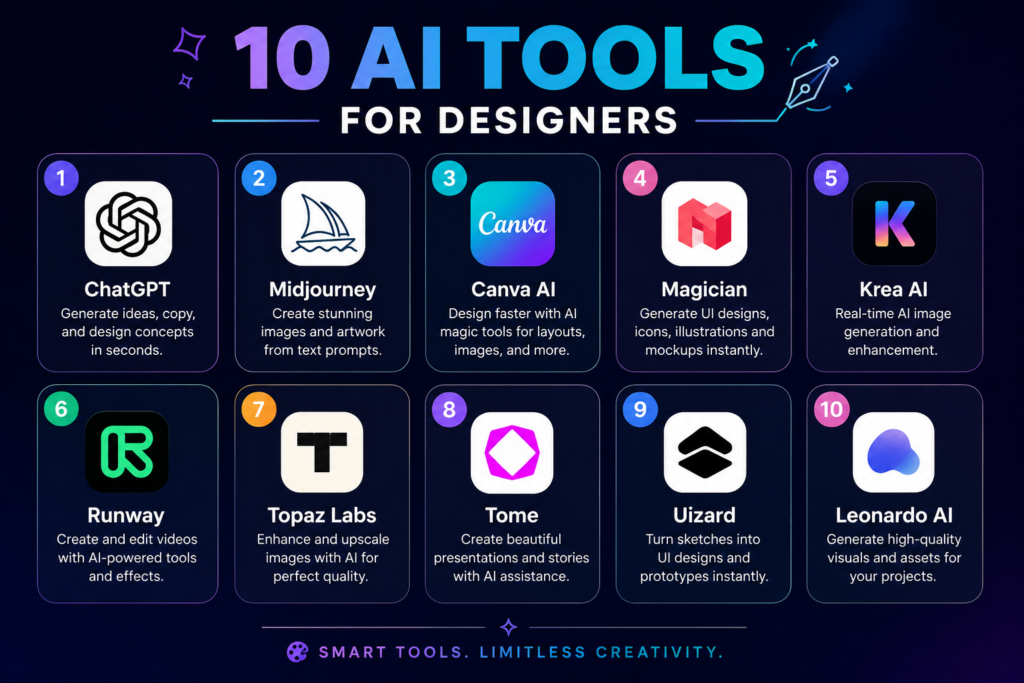
7. Kittl — AI-first design with branding and print built in
Instead of incorporating AI into a general-purpose editor after the fact, Kittl was designed with branding and print operations in mind from the start. Designers working on merchandise, packaging, and print-oriented branding projects who require AI generation and layout tools that already comprehend the limitations of those forms will find it to be a good fit.
Best for: Branding and print-focused designers — merch, packaging, posters — who want AI tuned for those formats specifically.
Pricing: Free tier available; paid plans for expanded assets and export options.
8. Visme — one platform for content-heavy visual work
With built-in AI features for object removal, background removal, and upscaling, Visme focuses on creating visual material that goes beyond simple image generation, such as presentations, infographics, papers, and branded content.
Designers or marketing teams that frequently require more than just static images may find it useful; consider reports, one-pagers, and data-driven visualisations.
Best for: Teams producing a mix of presentations, infographics, and branded documents alongside standard graphics.
Pricing: Free tier available; paid plans scale with team size and export needs.
9. Nano Banana (Google Gemini) — Google’s creative image model for fast iteration
Google’s generative model, Nano Banana, is optimised for imaginative image creation and visual reasoning. It offers robust support for refining an idea throughout several iterations and changing style throughout a collection of photos.
Teams that are already using Google’s products will find it convenient due to its interconnectivity throughout the Google ecosystem.
Best for: Designers who want fast, iterative style refinement and easy sharing across a Google-based workflow.
Pricing: Available through Google’s Gemini plans; check current pricing tiers.
10. Storyflow — the planning layer before any artwork begins
Storyflow is an endless canvas for the brief, concept, and mood-boarding work that takes place prior to creation; it is neither an image generator nor a pixel editor.
This closes a significant gap that most of the tools on this list don’t address for designers who’ve discovered that the quality of AI output greatly depends on how well a notion was articulated up front.
Best for: Designers and creative teams who want a dedicated space for creative direction before jumping into generation.
Pricing: Subscription pricing; check current vendor site for tiers.
How to Actually Pick
Avoid attempting to adopt all ten. The majority of working designers settle on a limited combination: one tool for conceptualisation and planning, another for production work that is safe for commercial use, and possibly a specialised for in-image text or vectors. Start with the bottleneck that currently costs you the most time, such as client-safe delivery, production, or concepting, and work your way up.
The Bottom Line
AI hasn’t taken the place of design judgement; human judgement is still required for composition, storytelling, and determining what a brand truly requires. The amount of mechanical effort surrounding those choices can now be completed in minutes rather than hours. In 2026, the designers who are making the most of these technologies are using them as a quicker initial draft rather than a final result.
Crunch Brief covers the AI tools actually worth your time — subscribe for weekly, practical coverage.