

It’s quite simple to divulge too much with AI chatbots. You have a lengthy email thread or spreadsheet open, you’re pressed for time, and it only takes two seconds to paste everything in. The response is excellent. Nothing negative appears to occur.
This habit is dangerous for precisely that reason. The expense is difficult to recoup and appears later, if at all.
The purpose of this guide is not to discourage you from using AI. It is designed to provide you with a quick and useful way to use it securely.
How common is this, really?
Survey numbers vary a lot, depending on who asks and how, so treat any single figure with care:
- A July 2026 survey of 500 US workers, commissioned by Kolmogorov Law, found 38% admitted to entering at least one kind of work information into an AI tool, and only about 36% knew that putting confidential company information into a personal AI account can be against the law.
- A 2026 PagerDuty survey of 1,250 office workers found 66% had used AI at work even though they believed it wasn’t permitted. In smaller companies, 40% had entered customer data into public AI models, versus 27% at larger ones.
- A Zapier-commissioned survey of about 1,000 US workers reported even higher numbers. Vendor surveys like these tend to run high.
- Cyberhaven, which analyzed millions of employee prompts, reported that roughly 11% of what people paste into ChatGPT is sensitive material.
The range is wide, from about four in ten to nearly nine in ten. But whichever number you trust, the direction is the same: lots of people are doing it. And the costs are showing up. IBM’s 2026 data breach report found that incidents linked to “shadow AI,” meaning AI tools used without approval, rose from 20% to 43% of AI-related breaches in a year, with an average cost of about $5.39 million for a breach involving shadow AI.
All-in-One Meeting Camera – 360° Conference Cam for PC Mac
Highly Integrated 360° Camera Design: Four cameras, microphones, and speaker are tightly integrated at the chip level, reducing system complexity while delivering…
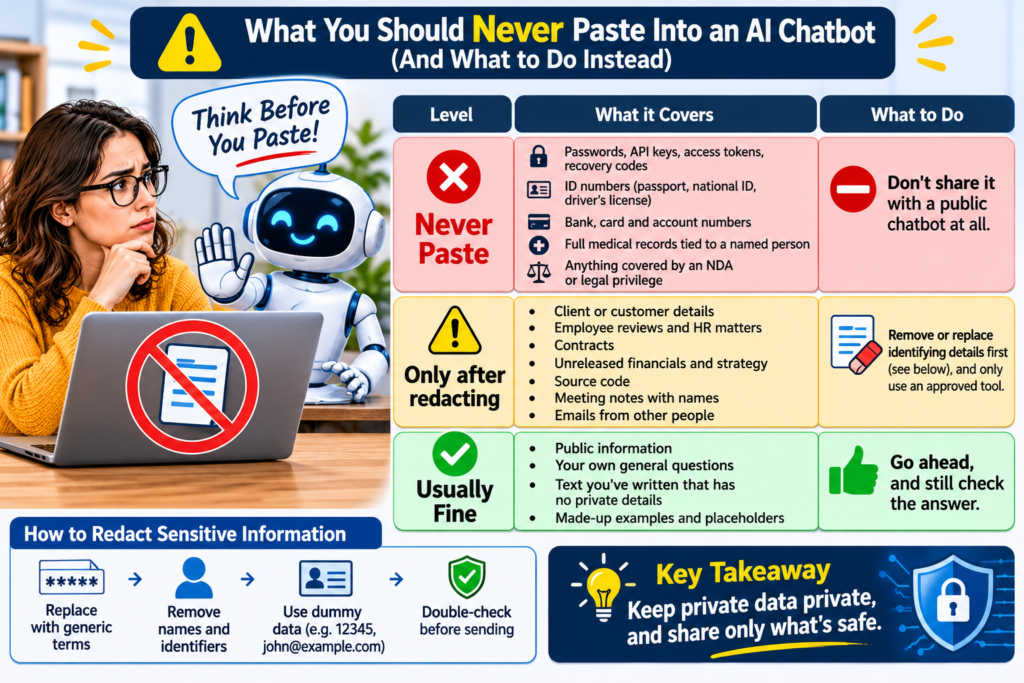
The red, yellow and green list
Use this as a quick filter before you paste anything.
| Level | What it covers | What to do |
|---|---|---|
| 🔴 Never paste | Passwords, API keys, access tokens, recovery codes; ID numbers (passport, national ID, driver’s license); bank, card and account numbers; full medical records tied to a named person; anything covered by an NDA or legal privilege | Don’t share it with a public chatbot at all |
| 🟡 Only after redacting | Client or customer details; employee reviews and HR matters; contracts; unreleased financials and strategy; source code; meeting notes with names; emails from other people | Remove or replace identifying details first (see below), and only use an approved tool |
| 🟢 Usually fine | Public information; your own general questions; text you’ve written that has no private details; made-up examples and placeholders | Go ahead, and still check the answer |
A good rule of thumb: if you wouldn’t be comfortable seeing it on a public web page or being read aloud in a meeting with your client present, don’t paste it as is.
Also remember that other people’s information isn’t yours to share. That includes colleagues, customers, friends and family. If their name is attached, think twice.
The 30-second “3 R” habit
Before you paste, do three quick things:
- Remove names, emails, phone numbers, addresses, account numbers and anything else that identifies a person or company.
- Replace them with placeholders, like [Client A], [Person 1], [Product X], [Amount].
- Reduce the text to only what the AI needs. Often a few paragraphs are enough, not the whole document.
Here’s a before-and-after.
Before:
Summarize this email from Maria Lopez at Greenfield Foods about invoice #48213 for $42,500, which she says we haven’t paid.
After:
Summarize this email from [Client A] about an overdue invoice of roughly [amount], and suggest a polite reply. Here’s the text with names removed: …
You’ll get the same quality of help, and you’ve kept the details out.

Meeting Owl 3 de Owl Labs – Cámara de sala de conferencias HD 1080p 360°, impulsada por IA para el orador
La Meeting Owl 3 es un dispositivo de videoconferencia todo en uno que captura vídeo 360° en 1080p HD y audio 360° hasta…
Safer ways to get the same help
- Use the tool your workplace approves. If your company offers an AI tool with business terms, use that one rather than a personal account. Check what it says about data use and storage, since terms differ between plans and products.
- Ask your IT or security team. If no policy exists, that’s worth knowing too. Many people paste sensitive data simply because nobody told them what’s allowed.
- Use fake examples. For tasks like drafting a template or testing a formula, invent the data. The AI doesn’t need real numbers to show you the structure.
- Process the sensitive part yourself. Let the AI help with the format, then fill in the real details afterwards on your own computer.
- Consider on-device or private options for highly sensitive work. Only if you have the know-how or IT support to set them up properly.
A 5-minute settings check
Every tool is different, and settings change, so check the one you actually use:
- Look for training and data controls. See whether your chats can be used to improve the model, and whether you can switch that off.
- Check chat history and memory. Some assistants save details across conversations. Review what’s stored and delete anything you don’t want kept.
- Look for temporary or private chat modes. Some tools offer them for one-off sensitive questions. Read what they do and don’t promise.
- Review shared links. Treat any chat you share like a public web page. Delete old shared links you no longer need.
- Use a strong password and two-step verification on your AI accounts. Your chat history is a record of what you’ve asked, so it deserves the same protection as email.
If you manage a team
The Zapier-commissioned survey made a point worth repeating: when employees feel they must paste customer data or logins into an AI to get their job done, that’s usually a tooling and policy problem, not just a people problem. A useful starting kit:
- A one-page rule with the red, yellow and green list above, adapted to your business
- An approved tool people can actually use
- A short training session with real examples
- A clear person to ask when something’s unclear
People break rules that are vague, slow or missing. Make the safe option the easy option.
If you already pasted something you shouldn’t have
Don’t panic, and don’t hide it. Steps worth taking:
- If it was a password, key or token, change or revoke it right away.
- Delete the chat and check any history or memory settings.
- Tell your IT or security team if it involved work or customer data. Reporting early is nearly always better than being found out later.
- If personal data about other people was involved, your organization may have legal duties, so get advice. I’m not a lawyer, and this article isn’t legal advice.
Your turn: a 10-minute privacy check
This week:
- Look at your last five AI chats. Would you be comfortable if each one were read by your boss or client?
- Pick one habit to adopt, such as the 3 R redaction routine.
- Spend five minutes on your settings checklist.
If you’d like to share how your team handles this, hit reply. The best ideas may appear in a future issue, anonymously.
Quick self-test
Which of these is it safe to paste into a public chatbot as written?
- A. A customer’s name and order history
- B. Your login details, so the AI can “help you sign in”
- C. A paragraph from your own blog post draft with no private details
- D. A contract your client asked you to keep confidential
Answer: C. A and D need redacting or approval, and B should never be shared with a chatbot.
If someone on your team uses AI every day, forward this their way. Next week: a one-page AI use policy you can copy and adapt for a small business.